Cryogram is in early access. Join the waitlist

AI builds it once, code runs it every time

Describe a job once.
It becomes code that runs in one click.

You already get AI to do real work. Cryogram is for the jobs you repeat. Describe the task in a chat, the AI figures out how to do it once in front of you, then writes it into code on your machine: an automation you run with one click, that does the same thing every time. Once built, most steps use no AI at all, so runs are fast and cost little. You never have to read the code, but you can, and it is yours.

Cryogram is free on your own computer, and needs no account. Build with the Claude or ChatGPT subscription you already have, or an API key, and run AI steps on the provider you choose. Your data stays on your machine and in your systems, and nothing of yours passes through us.

An example automation, built from one prompt

“Take the CVs that arrive in our jobs inbox, score each one against the role, save a shortlist to the shared folder, and let the team know in Slack.”

same steps, same order · every run checked and logged ✓ Shortlist saved · Slack notified · run logged

Why turn it into code

An agent can do almost anything once.
A job you repeat needs more.

You can hand a task to Claude or an agent tool and have it done this afternoon. Run the same task every morning and the weaknesses show: the agent thinks the whole job through again on every run, so each run is slow, uses your tokens or quota, and can come out differently from one day to the next. That is fine for one-off tasks. It is too unreliable for a task you depend on at work.

Writing the automation yourself is the other option, and the script is the smallest part of that. To run safely at work, it also needs a contained place to run it so a mistake doesn't spread, a safe place for passwords and keys, checks on every step, a clean stop when something fails, and a record of every run. Setting that up from scratch takes far longer than the script itself, and until it all works, you are the one debugging it. Cryogram has all of it built in, so the describe-and-correct loop you know from tools like Lovable is all you do.

Ask an agent each timeClaude · ChatGPT · Cowork Scripts you write with AIClaude · Cursor · Codex App-to-app toolsZapier · Make · n8n Cryogram
AI builds it for you You test and fix it
Tested on your data before you rely on it
Same result every time
Routine steps run without AI, so runs are fast and near-free
Supervised runs, secrets and checks set up for you Secrets only
Reaches local files, folders and internal systems Some tools can
Stops safely, then repairs itself when something changes ✓ †
A colleague can run it without learning anything With an account
Free to run, however much you use it Self-hosted only

† It stops the run before a wrong result is passed on, the AI then proposes a fix, and the fix is tested before it is applied.
Steps that use AI go to your own provider, on your keys.


How it works

You describe it. Cryogram builds it.
Then it just runs.

Cryogram's AI does the job once, for real, on an example you give it. It then writes the routine parts of what it did, fetching the file, reading the columns, shaping the output, into ordinary Python a developer could read, though you never need to. Code does the same thing every time, and this code belongs to you. AI is used only in the steps that need judgement, such as scoring a CV or drafting a reply. Every step is tested on data you provide, real or sample, before it is saved, so the automation you get has already done the job correctly at least once. That is why runs are fast and cost little.

Describe the job

Tell Cryogram what you want in a chat, and point it at a real or sample file, inbox or system. It works through the job in front of you, and you correct and approve as it goes.

Watch it take shape

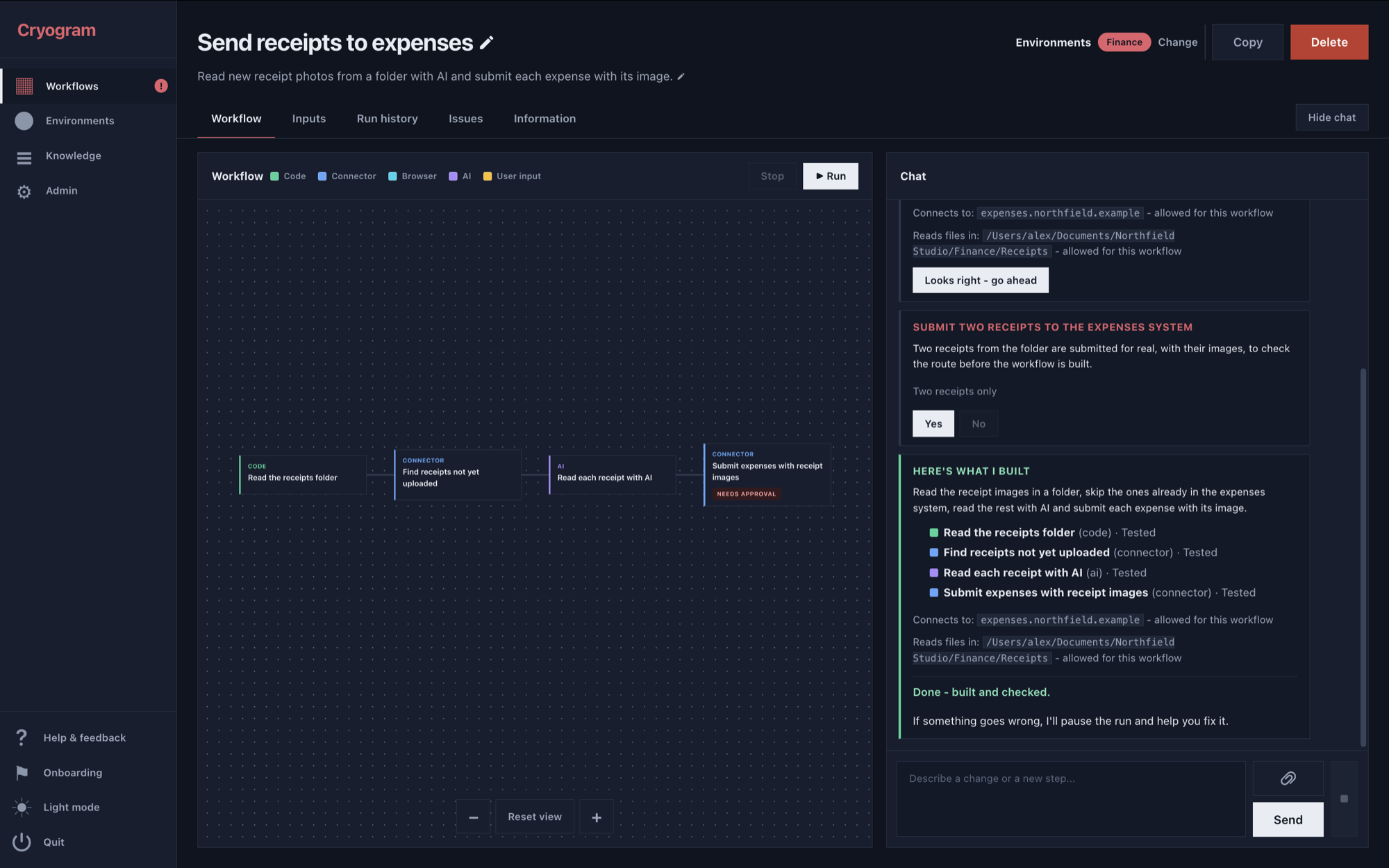
The automation appears as visible steps you can read, test one at a time and adjust. You see exactly what each step does before you rely on it.

Run it on real data

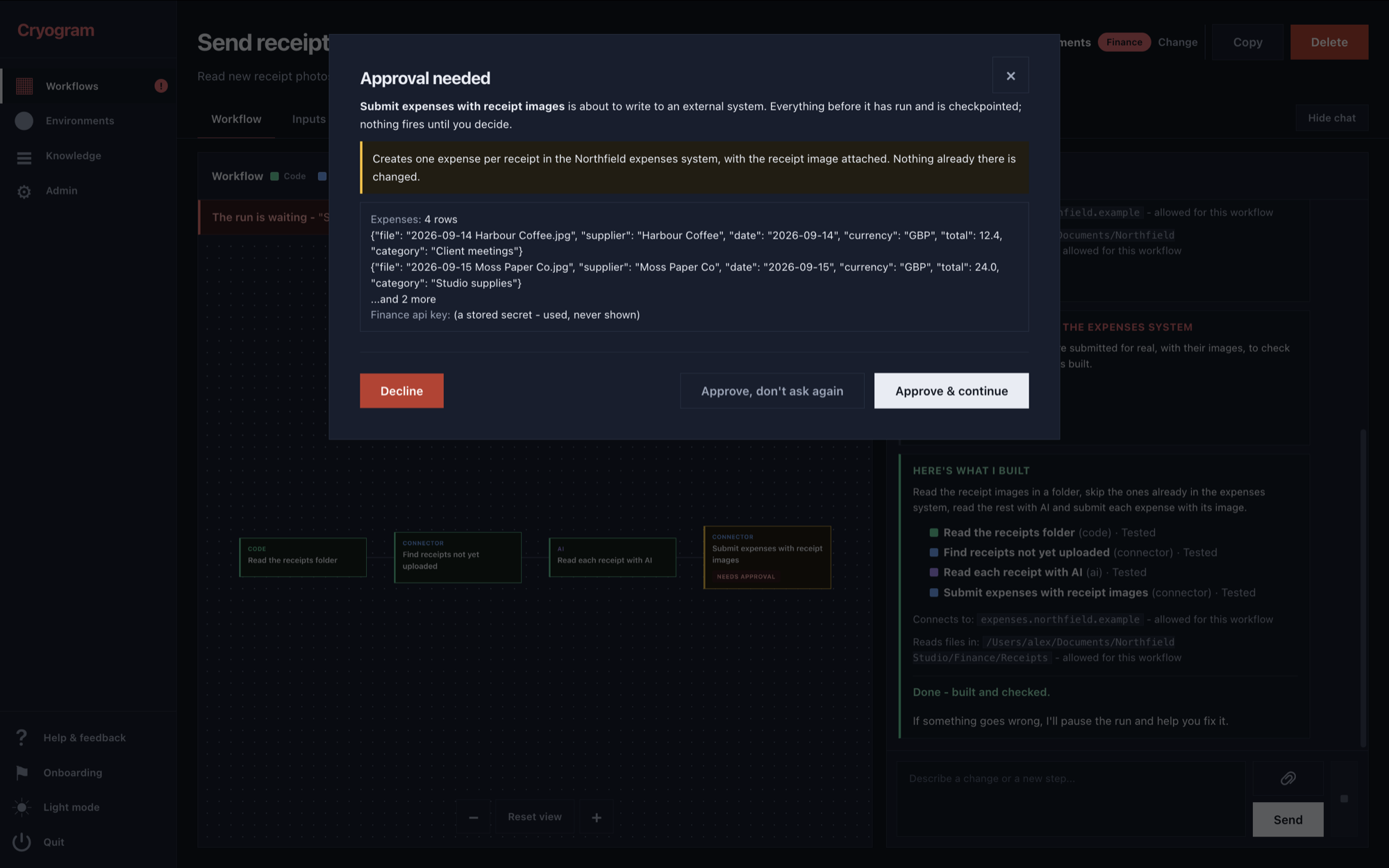
Press Run. It asks when it needs a decision, asks before anything is sent out, and gives you the results along with a full history of every run.

It repairs itself. When a check fails, the AI investigates what changed and proposes a fix, and the fix is applied only once it passes the automation's checks again. Any step that touches an outside system, such as sending an email or updating a record, asks you first. When something cannot run correctly, the automation stops and tells you, rather than producing a wrong result that looks right.

Fast runs Most steps are ordinary code, so they finish in seconds; only the steps that use AI wait for a model.
The same result every time Every run follows the same steps in the same order, and each step checks its result before the next one starts.
It checks its own work During the build, Cryogram writes checks for each step based on the run it watched. Every later run is held to them, and a result that fails a check stops the run instead of being passed on.
You can see inside it The automation is laid out as steps you can read, test and adjust, with a full history of every run, and the whole automation exports to a file you keep.
Private by design It runs on your machine, with no account and no upload. Everything it needs comes with it, it can check for updates without sending anything about you, and the only thing that ever leaves is a problem report you read in full and choose to send.

Sharing

Share it as a button.

Most of what you build will be for you. When you build one that a colleague or a friend could use too, you can share it: they get a button and an input form. They press Run, answer what the automation asks, and get the results. They never have to learn an AI tool or understand how the automation works inside.


Examples

Things our users have automated.

Every automation built with Cryogram works the same way: you can open it and see what each step does, it does the same thing on every run, and many use no AI at all once built. Build against sample data, then run on the real thing, all on your own machine. Every automation is ordinary Python you can read step by step in the app, and the whole automation exports to a file you keep.

Office manager

The week's receipt photos read from a folder and entered into the expenses system: merchant, date, amount, photo attached, one claim per receipt.

Time saved45 minutes every week

Recruiter

Each incoming CV read and added to a searchable SharePoint list: name, role, experience and contact details, with a link to the original file.

Time saved2-3 minutes per CV, 20 a day

Small sales team

Every email enquiry logged in a shared table: who wrote, what they want, when, and whether anyone has replied.

Time saved20 minutes every day

Compliance officer

A full background report from just a company name: registration details, directors, licences, sanctions screening, latest filed accounts and recent news, compiled from the official registers.

Time saved10-15 minutes per company, 10 a week


Questions

The short answers.

How is this different from asking Claude or an agent every time?

An agent thinks the whole task through on every run, so each run is slow, uses your tokens, and can come out differently from one day to the next. Cryogram uses AI once, while building, and writes the result into code: the routine steps run the same way every time, and only the steps that need judgement use AI at all.

I could build this myself with Claude or Cursor. Why wouldn't I?

You could, and the script is the smallest part. To run it safely at work you would also set up a contained place to run it, storage for passwords and keys, checks on each step, a clean stop on failure and a run history, and you would debug the drafts until they work. Cryogram has all of that built in, and it tests every step by doing the job for real before the step is saved.

Do I need my own AI account?

Yes. Build with a Claude or ChatGPT subscription, or an API key, and run AI steps on the provider you choose from a long list, always on your own keys. That is part of why the app can be free and private: nothing of yours passes through us.

What happens when an automation breaks?

It stops safely mid-run and tells you in plain language what stopped and why. The AI then investigates what changed and proposes a fix, and the fix is applied only after it passes the automation's checks again. Anything that touches the outside world asks you first.

Read the full FAQ →

Early access

Start automating.

We are opening access in batches, so that everyone who joins gets properly set up and supported. Leave your name and email and we will let you know when your access is ready.